Kubernetes : restart a deployment
The following command will restart all pods associated with a given deployment.
kubectl --namespace [namespace-name] rollout restart deployment [deployment-name]
Pods are only restarted, not recreated.
The following command will restart all pods associated with a given deployment.
kubectl --namespace [namespace-name] rollout restart deployment [deployment-name]
Pods are only restarted, not recreated.
Append the following line ate the end of /boot/firmware/config.txt on a rapsbianOS
dtoverlay=allo-boss-dac-pcm512x-audio
I want to migrate some services from virtual-machine to containers and I want to use Podman to benefit from pods.
From an IPv6 networking standpoint, I have two requirements :
My ISP provide me with a /48 subnet, however this subnet change every few weeks, so I cant assign a static address from it to the containers. I rely on SLAAC (with a workaround to make it work) to address them, this solve the connection to internet, but not the communication with the reverse proxy.
The reverse proxy run on a virtual-machine with a static handwritten configuration. Either I find a way to have a DNS point to the container based on some static FQDN or I assign a static local-link IPv6 to the container.
Podman have some sort on integrated dns for this purpose, but I know static address to be more reliable.
The containers are hosted on a virtual machine with a dedicated network interface, the gateway is an opnsense firewall, I use a macvlan network to allow layer 2 communication with the firewall while isolating the containers from the host.
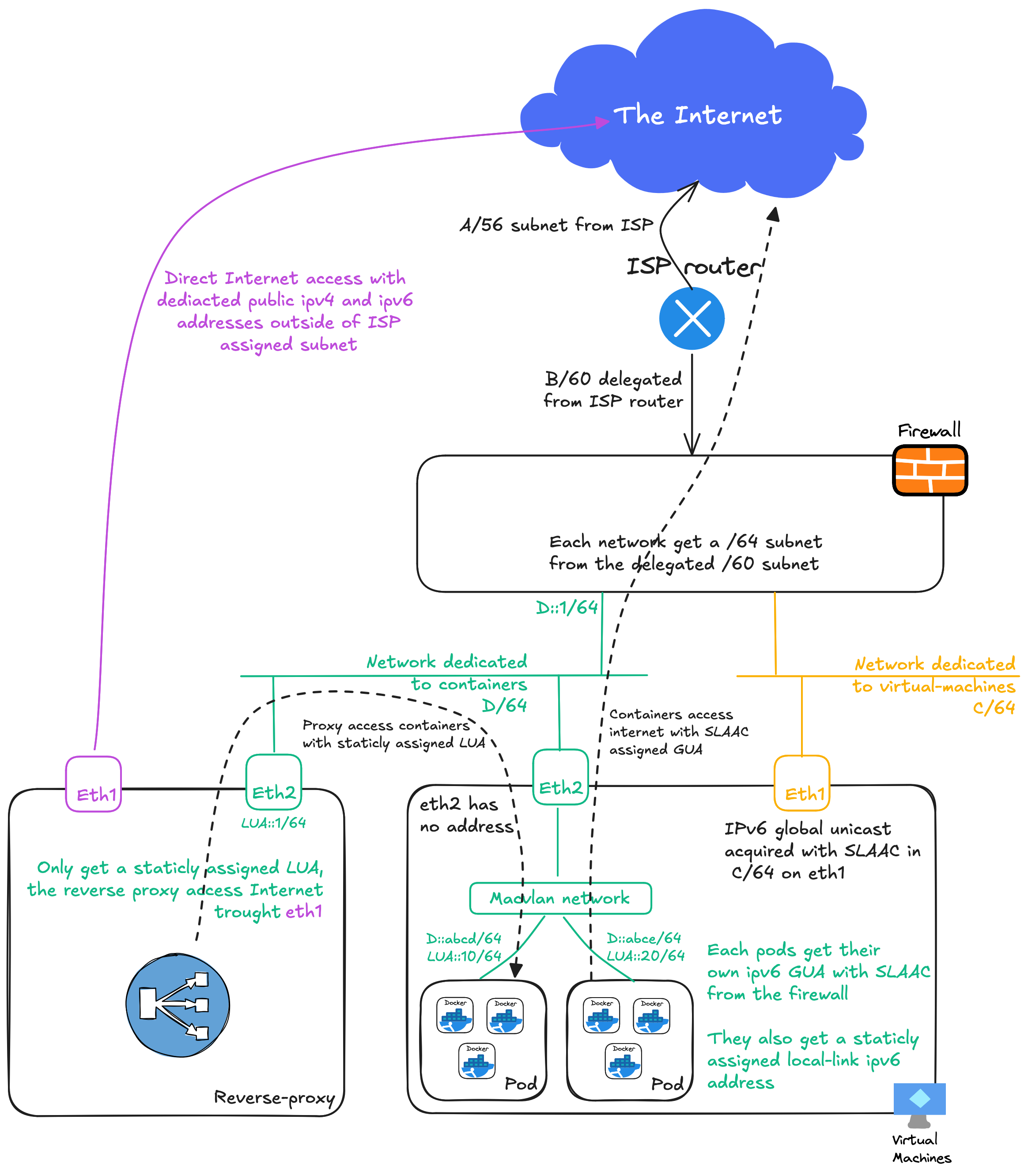 Drawing of what the end result should look like
Create the network
podman network create \
    --driver macvlan \
    --opt parent=eth1 \
    --ipv6 \
    --ipam-driver host-local \
    --subnet 192.0.2.0/24 \
    --gateway 192.0.2.1 \
    --subnet fd00:db8::/64 \
    public-services
--ipv6 enable ipv6 on the network
--ipam-driver host-local select the address attribution mechanism (see the doc)
The host-local driver enable static address attribution for local-link ipv6 and ipv4 addresses.
I do not declare a gateway in the ipv6 subnet because there is none, however podman will configure one by default.
podman network inspect public-services
[
     {
          "name": "public-services",
          "id": "6ce...58f",
          "driver": "macvlan",
          "network_interface": "eth1",
          "subnets": [
               {
                    "subnet": "192.0.2.0/24",
                    "gateway": "192.0.2.1"
               },
               {
                    "subnet": "fd00:db8::/64",
                    "gateway": "fd00:db8::1" <- generated by podman
               }
          ],
          "ipv6_enabled": true,
          "internal": false,
          "dns_enabled": true,
          "ipam_options": {
               "driver": "host-local"
          }
     }
]
Then create a pod
podman pod create \
    --name service-pod \
    --network public-services:ip6=fd00:db8::100,ip=192.0.2.100 \
    --sysctl net.ipv6.conf.eth0.autoconf=1
--sysctl net.ipv6.conf.eth0.autoconf=1 enable SLAAC addressing for eth0 for this pod
And create a container
podman create --pod service-pod docker.io/traefik/whoami
Start the pod, and you should be able to access the container both from the local-link ipv6 and from a SLAAC generated IPv6.
For debugging purpose, you can nicolaka/netshootimage
podman create \
    --pod service-pod \
    --cap-add NET_RAW,NET_ADMIN \
    --interactive \
    nicolaka/netshoot
Start the pod, then open a sheel in the container : podman exec -it [container name] zsh
While this setup work, two ipv6 default route are installed in the pod, one generated from the NDP RA, and one given by podman and staticly installed to fd00:db8::1. The latest does not exist, but it is installed with a lower metrics and has priority. In most case, if the mac address associated with the gateway can not be resolved with NDP, the container will try the next default route (the SLAAC/RA one, which work). But it is not ideal.
Also, during my expirimentation, I learned that it is not possible to define custom network in k8s like yaml file to play with podman kube play. Nor is it possible to rattach pods to an existing network.
This make podman with play kube a no go for my use case.
From this discussion on github I thinks podman is more oriented for developement than any kind of “production”. Maybe it's time to go the kubernetes ways ...
As easy as the follwing command :
qm terminal [vmid]
Tested on proxmox 8.2.4
qm disk import [vmid] [/path/to/.qcow2] [storage]
E.g : qm disk import 900 /tmp/disk.qcow2 localvm
I often use debian cloud image both for lab and test virtual machines. By default, those images are only 2 GB and sometimes I need more space.
On proxmox :
[VM] > Hardware > [disk] > Disk Action > Resize
On UTM :
[VM] > Settings > [disk] > Resize
Start the VM and install cloud-guest-utils
apt install cloud-guest-utils
Resize the root partition with growpart
# growpart [disk] [partition number]
growpart /dev/vda 1
Restart and Voila !